Portakal is a learning management system built around a complete course product, not just a marketing site with gated videos behind it.
The project brings together public course discovery, a student dashboard, and an admin authoring area in the same application. That makes it interesting as both a product and a codebase. It is not only about selling courses. It is about what happens before purchase, after enrollment, and while the content itself is being managed.
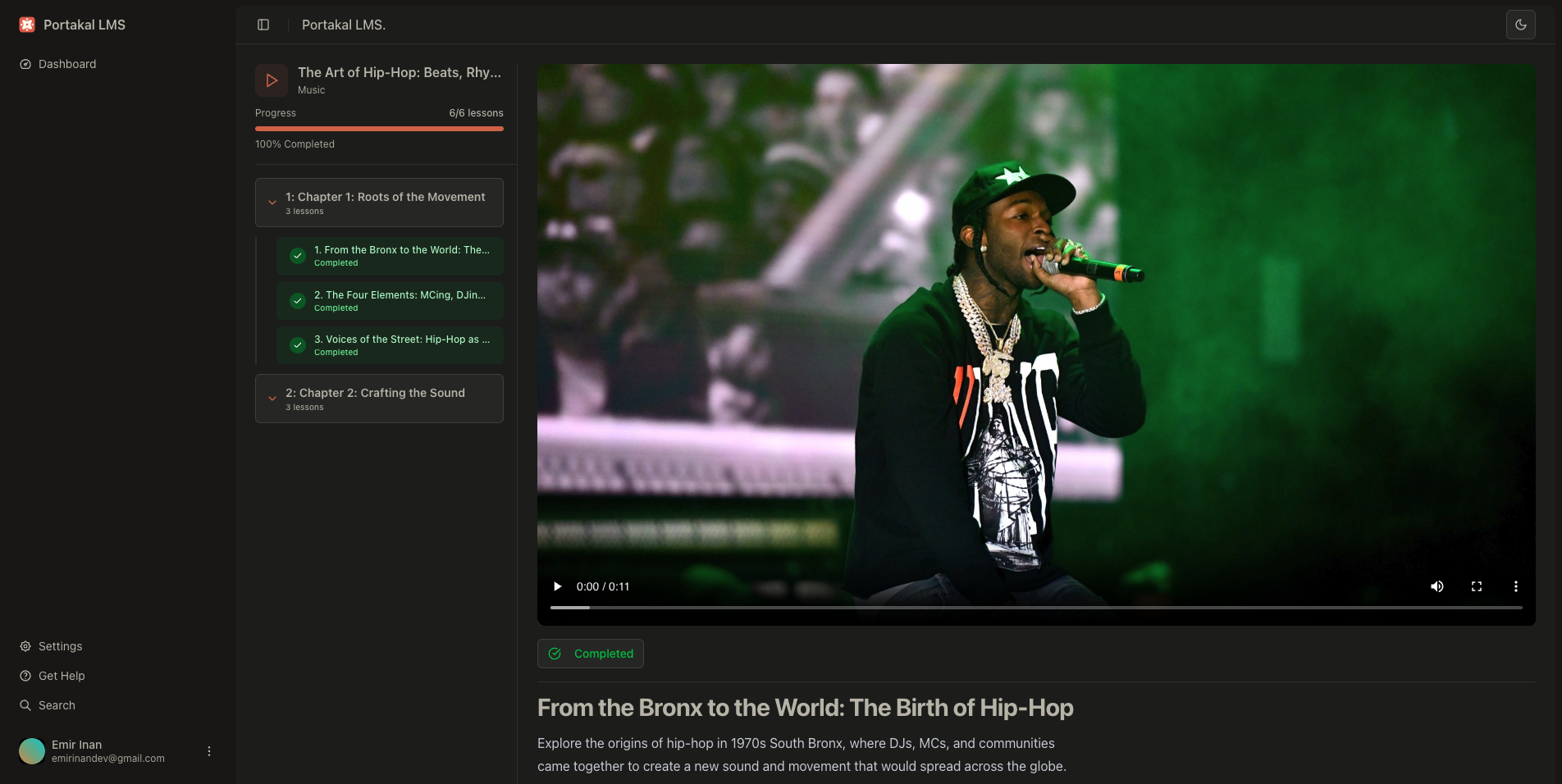
Three Clear Surfaces
One of the stronger qualities of the project is that it is not trapped in a single user role.
Portakal has three distinct surfaces:
- a public-facing site for browsing courses
- a student area for enrolled learning
- an admin area for course creation and management
That separation makes the product feel more complete. A lot of learning projects stop at “here is a course page and a payment button.” This one goes further and treats the platform like a real system with different responsibilities on each side.
Course Products, Not Just Course Pages
At the center of the app is a simple but practical content model:
- Courses
- Chapters
- Lessons
This hierarchy does exactly what it needs to do. Admins can structure material clearly, and students can move through that structure without the interface becoming confusing. Lessons are not flat content blocks. They belong to a progression.
The authoring side also matters here. Rich text editing is handled with TipTap, while media assets such as thumbnails and videos are stored in AWS S3. That gives the project a more realistic publishing workflow. Content is not just typed into a textarea and saved. It is authored, organized, uploaded, and presented as a real product.
Enrollment and Payment Flow
An LMS becomes more convincing once payment is part of the system rather than an afterthought.
Portakal uses Stripe for course purchases, which means enrollment is tied directly to a real transaction flow. That turns the platform into something closer to a small SaaS product than a static prototype. A course can be published, purchased, and then appear inside the student experience in a way that feels connected end to end.
This is one of the more useful aspects of the repository if you are studying product architecture. It shows how content, commerce, and access control can live inside the same application without collapsing into a mess of unrelated concerns.
Progress Is Part of the Product
The student side is not only a list of owned courses. It also tracks lesson completion and enrollment state in the database.
That sounds like a normal LMS feature, but it changes the feel of the app. Once progress is modeled properly, the product stops being a file library and starts behaving like a learning system. Students can see what they started, what they finished, and where they are in a course.
This is what gives the dashboard real weight. It is not just a protected area after login. It is where learning actually continues.
Admin Workflows Matter
The admin panel is what makes the project feel substantial.
It covers course creation, editing, analytics, lesson organization, and media handling. That means the codebase has to account for more than frontend presentation. It has to support the actual maintenance of a course catalog over time.
This is the part many portfolio LMS projects skip. They show the student view because it is easier to present. Portakal is more interesting because it also treats internal tooling as part of the product.
The Stack Matches the Problem
The technology choices are modern, but more importantly, they fit the shape of the app:
- Next.js 15 and React 19 for the application shell and route structure
- Better Auth for authentication, including GitHub OAuth and email-based flows
- Prisma with PostgreSQL for the core relational model
- Stripe for purchases and enrollment-adjacent payment logic
- AWS S3 for media storage
- Arcjet for rate limiting and bot protection
- Tailwind CSS v4 and Radix UI for the interface layer
This is not an experimental stack for its own sake. It is a production-style stack for an education product that has content, accounts, uploads, and payments.
Why It Works as a Project
Portakal is compelling because it combines multiple product concerns without losing structure.
It has public marketing pages, authentication, protected learning space, content management, media uploads, payments, and progress tracking. Each one is common on its own. The value of the project is that they are brought together in a way that still feels coherent.
That makes it a good project to write about. It is not interesting only because it uses modern tools. It is interesting because it shows how those tools can support a real product with multiple surfaces and responsibilities.
Closing Thoughts
Portakal is essentially a compact LMS product built with the modern Next.js ecosystem.
What makes it worth studying is not just that it has courses, dashboards, and payments. It is that the whole lifecycle is represented: discovery, enrollment, content delivery, progress, and administration.
If I had to summarize it in one sentence, it would be this:
Portakal is a modern course platform that combines public discovery, student progress, and admin authoring into one structured full-stack product.
That is what gives it weight beyond a typical showcase project.